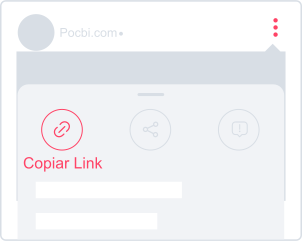
1. Copy the video link
On the Instagram post you want to download, tap the Share icon and choose Copy link.
Save Reels, Stories, photos, and carousels from Instagram
Save public Instagram Reels, Stories and photo carousels to view offline, without installing an app.
Paste the post link to see the available files. Downloads are free and require no account. Full HD is available when supported by the source.
On the Instagram post you want to download, tap the Share icon and choose Copy link.
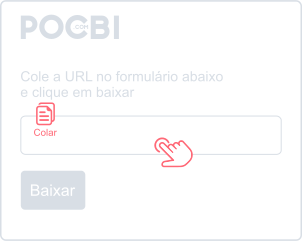
Paste the link into the field above or tap Paste. Wait for the post details to load.
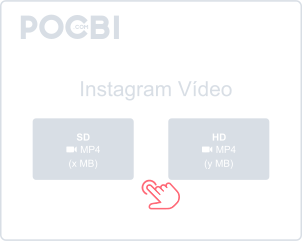
Choose an available video or cover image and tap Download. Look for the file in your device’s Downloads folder.
Open Pocbi in your phone or computer browser and paste the post link. You do not need an account, app or browser extension.
Save Reels to watch offline, with audio and Full HD resolution when available.
Copy the post link to download individual photos or carousel files. Pocbi preserves the quality of the available images.
Save Stories from public profiles before they expire after 24 hours.
Use Pocbi in the browser on Android, iPhone, tablets, Windows or Mac, without installing another app.
Save the files to view offline and organize them in your device’s folders or gallery.
Pocbi preserves the available file without adding a logo or watermark.
Add several links to look up multiple videos in the same request.
You can also copy a video’s full caption text. Keep a recipe or tutorial’s instructions alongside the downloaded file.
The official Pocbi extension for Google Chrome lets you download Instagram content from your timeline with one click. Installation is optional; you can also use the website.
Chrome ExtensionYou can also download content from the other supported social networks listed below.
Open the video or Reel on Instagram, tap Share and choose Copy link. Paste it into Pocbi and tap Download. Check your browser’s download list or your phone’s Downloads folder for the file.
Open Instagram in the browser, open the post you want, and copy the link by tapping Share below the post or directly from the address bar. For Stories, open the story and copy the URL from the address bar. Then go to pocbi.com, paste the link, and click Download. The video will be saved to your Downloads folder.
To download a Reel, open the Reel on Instagram, tap Share, and choose Copy link. Go to Pocbi, paste the link, and click Download. You can choose the available video quality before confirming the download.
Open the Story before it expires after 24 hours. Copy its URL from the browser address bar, or use Share and Copy link on mobile when available. Paste it into Pocbi and click Download.
For single photos or carousels with multiple images, copy the post link by tapping Share and paste it into Pocbi. The tool processes all carousel files at once, allowing you to download every photo from the post in one flow.
Yes. All videos, Reels, and Stories downloaded through Pocbi keep the original audio, including music and narration that are part of the content.
Check your browser’s download list and the Downloads folder. On mobile, the file may also appear in your gallery. Change the destination folder in your browser settings if needed.
Yes. Downloads are free for Reels, Stories, photos, carousels and other supported networks, without a subscription or account.
After the download, open the file in the Downloads folder or in your phone gallery. Tap the video, choose Share, and select WhatsApp. Then choose the contact or group and send it. The same process works for any messaging app.
Download only content you have the right to save. Public access, personal use and credit do not automatically grant a reuse license. Check the applicable law, license and rights holder’s permission before republishing or commercial use.