
1. Copy the video link
In TikTok, tap Share on the right side of the video and choose Copy link.
No watermark
Copy the TikTok video link and follow the steps to download it.
In TikTok, tap Share on the right side of the video and choose Copy link.
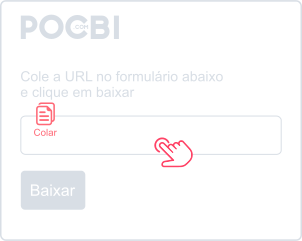
Paste the link into the field above. On mobile, press and hold the field; on desktop, right-click and choose Paste.
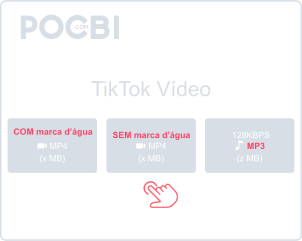
Choose an available video, with or without a watermark, or MP3 audio. Wait for the file to be ready.
Save public TikTok videos to watch offline. Copy the link and check the available download options in Pocbi.
Downloads are free and include watermark-free options when available.
Use Pocbi in your browser on Android, iPhone, Windows or Mac. No app installation is required.
Copy the video link, paste it above and choose an available file to download.
You can also download videos from the other supported networks listed below.
In TikTok, tap Share and choose Copy link. Open Pocbi in your Android or iPhone browser, paste the address and tap Download. Choose an available video, with or without a watermark, or MP3 audio.
Open pocbi.com in your phone browser, paste a public link and check the download options.
Open the TikTok video in your PC or Mac browser. Click Share, then Copy link. Paste it into Pocbi, click Download and choose an available video or MP3 audio file.
Paste the TikTok link and click Download. Choose the watermark-free option if it is available.
Check the Downloads folder and your browser’s download list. On mobile, the file may also appear in your gallery.
Yes, all TikTok and other social network download features provided by Pocbi are completely free.
Yes, when MP3 is available. Paste the link, click Download and choose the audio file.
Open the downloaded video in your Downloads folder or gallery. Choose Share, select WhatsApp and pick a contact or group.
The TikTok video quality will be the same as the original file uploaded to the platform.